Showing posts with label AZ-203 Exam preparation study material. Show all posts

Monday, April 22, 2019

Developing Solution for Microsoft Azure - Exam AZ-203


Here is the topic list to focus on the exam AZ-203 Developing Solution for Microsoft Azure.
I am preparing the notes, learning and study points by searching the each sub topic in the Google and prefer the first 3 link including the Microsoft Documents on Azure on  search result page.

Apart from these, I have also free Azure subscription and Pay as you go subscription to test the exam oriented topics.

And also I have collected many eBooks on the internet, here is the links for you to download


There is also Microsoft Learning portal , that is specifically allow you to select your Azure Role and display the related course content. If you are preparing for the AZ-203 exam, surely this will be useful for.
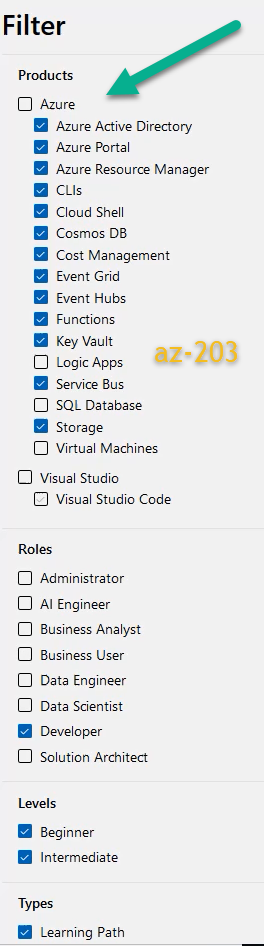
All you need is select the appropriate course for AZ-203 exam, Here I have selected with required filter and got the  result.

Microsoft Azure Learning Path for exam AZ-203


Gradually I will update the each subject and sub topic with relevant link.

1. Developing Azure Infrastructure as a Service Compute Solutions (10-15%)
  • The sub-categories of this module includes
  • Creating containerized solutions
  • Implementing batch jobs by using Azure Batch Services
  • Implementing solutions that use virtual machines
2. Develop Azure Platform as a Service Compute Solutions (20-25%)
  • Creating Azure app service web apps
  • Creating Azure app service API apps
  • Creating Azure app service mobile apps
  • Implementing Azure functions

3. Developing for Azure storage (15-20%)
  • Developing solutions that use blob storage
  • Developing solutions that use a relational database
  • Developing solutions that use Cosmos DB storage
  • Develop solutions that use storage tables
4. Implementing Azure security (10-15%)
  • Implementing Access Control
  • Implementing Authentication
  • Implementing Secure Data Solutions
5. Monitoring, troubleshooting, and optimizing Azure solutions (15-20%)

6. Connect to and expend Azure Services and Third-party Services (20-25%)
  • Establishing API Gateways
  • Integrating Azure search within solutions
  • Developing an app service logic app

Monday, March 25, 2019

Create an Azure App Service Web App

My personal notes for preparing the exam AZ-203:Developing Solution for Azure
Topic:       Develop Azure Platform as a Service Compute Solutions
Sub topic : Create an Azure App Service Web App

As we learned , Azure App service is logical container for creating the web, mobile apps ad service app. In this section we are going to see how the web app can be created through multiple options like Azure Portal , Azure CLI (Command Line Interface ) shell , Visual Studio using Azure SDK.NET.

Once you created the Web App in your App Service , there are multiple cloud based services can be used to deploy the web contents.

You can deploy your code and web contents through below methods such as 


  • Local Git
  • WAR/Zip
  • One Drive Sync
  • BitBucket
  • GitHub
  • DropBox Sync
  • Azure DevOps
  • FTP
  • Web Deploy.

For exam , you must be prepared thoroughly and know the sequence of steps to be followed to complete the deployment activities. Nowadays DevOps and Automation are preferred model to deploy which the Continuous Delivery / Continuous Integration (CI / CD).

If you want to go ahead with DevOps approaches for deploying the code or contents to your web app, then you should not choose the Local Git , Web Deploy (through Publishing the web app from Visual Studio) and FTP. 
Azure Service for Web App , by default supporting the Local Git, you can directly commit,push and pull the contents any time.

You can safely ignore the WAR/Zip, BitBucket , DropBox Sync and OneDrive Sync for deploying the code to your web app, because it has some limitation and not popular as GitHub repository.

In all this, you cannot ignore the buzz word "Azure DevOps", This is nothing but web edition of the Visual Studio Team Service (VSTS). You can manage multiple projects, build , release and control the version and manage the pipeline project.

It gives the rich user interface to all project stakeholders to communicate through assigning the tasks and personalized dashboard and finally you can package the source code and push to deployment or continuous integration.

Please check the AzureDev Ops introduction video link to get the quick understanding on the topic.

So focus on how to use the Azure DevOps , Local Git and GitHub for continuous deployment and integration on Azure Service for Web App.

Deploying code to App Service