Here are the list of databases and its default recovery model available on SharePoint related content databases.
As SharePoint tend to be available on all time and span to host able on different server and beyond the network and geographies, we should understand its recovery model.
This precise information is very critical and wanted when the database damaged or corrupted especially a SharePoint Config and SharePoint_AdminContent databases to restore the FARM as soon as possible in time.
Recovery models Simple,Full and Bulk logged has its own advantages and disadvantages.
Learn more about these recovery model @ MSDN
You may update its from default recovery model to another recovery model as per your SQL Capacity plan.
Monday, March 14, 2016
Thursday, March 10, 2016
Missing server side dependencies
Missing server side dependencies in SharePoint is one the main problem that stops being upgraded or migrate to next version of the SharePoint.
SharePoint administrator has to take prompt action on this problem on his farm.
The "SharePoint Health Analyzer" report this problem under "Configuration" category and you have to take the manual job to delete these missing server side dependencies.
Example,If you are installing the WSP package that contains the features and webparts, that will create the related SharePoint artifact folders on the server such as folder name with feature under \Template\Features and user controls under CONTROL TEMPLATE so on.
When you retracting the WSP package from the farm, it should wipe out all the folders that created on deploying the solution.
You have to create the batch file to disable/uninstall the feature while retracting them.
Same analogue, will be applied the missing server dependencies , even though you retracted package from the server , feature / webpart name references will not be deleted from the "SharePoint_Admin_Content Database." Even though you deleted the web config entry that related to missing features, could be "
This will be called "Orphaned features" in the SharePoint.Before going to look into resolve this problem, we should learn What is the reason ? why the missing server side dependencies are clogged in the SharePoint server ?
The reason is very straight forward, you might forcefully uninstall the solution without deactivating the features that are scoped to site / web / web application and Farm.
How to prevent the "Missing Dependencies" issues on the SharePoint.
Always use the "Feature event receiver class" to delete the feature folder from the server when its deactivating.
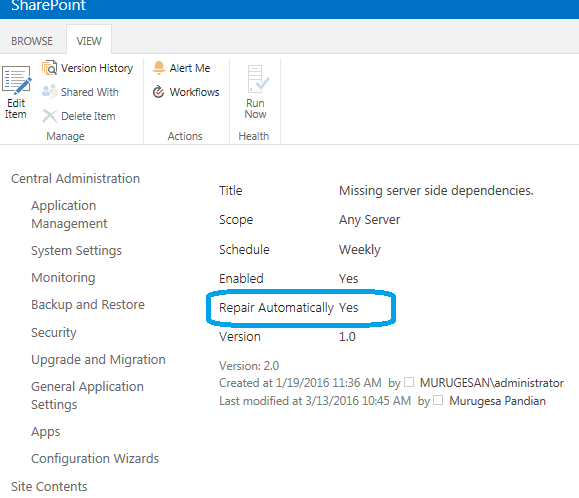
Create the "Health Analyzer definition rule to "Repair automatically" to yes.
Somehow, we missed and found so many "Missing Server Side dependencies", now we will see on how to resolve this configuration problem,
Resolution : #1
$feature = Get-SPFeature | ? { $_.DisplayName -eq "Orphaned feature reported in HealthAnalyzer" }
$feature.Delete()
Sometime, the webpart also can be missing and reported by Health Analyzer.I just open the content database and select the table dbo.AllWebParts and fired the delete command.(For safer side, have your Content DB backup).
Resolution : #2
DELETE from [WSS_Content].[dbo].[AllWebParts] where tp_WebPartTypeId='c6f6e5a5-1038-13a7-87c1-0db44446d99a'
Resolution: #3,
Download the SharePoint Utility called "SharePoint Feature Administration and Cleanup" from codeplex that will help you to identify the faulty features on the farm.
Missing dependencies in SharePoint
Monday, March 07, 2016
jQuery ajax method and SharePoint list
Using jQuery ajax method we can initiate the RESTful request to retrieve the SharePoint List Items that has been designated as resources through end point.
Once the end point has been identified, the query will be used to make CRUD operation using OData protocol.
Here is the simple code snippet and bit explanation behind the jQuery ajax call and the call back method.
All you need to is to pass the SharePoint's REST endpoint URI as url parameter to ajax method.
And request what data format has to be returned by the request by specifying the header format.
To get the clear exception, log the error details using data.responseText. Here I just renamed the list track to trac and logged the exception details.
Once the end point has been identified, the query will be used to make CRUD operation using OData protocol.
Here is the simple code snippet and bit explanation behind the jQuery ajax call and the call back method.
All you need to is to pass the SharePoint's REST endpoint URI as url parameter to ajax method.
And request what data format has to be returned by the request by specifying the header format.
$(document).ready(function () {
$.ajax(
{
url: "http://win-0nvq2rjqgo2/_api/web/lists/getbytitle('trac')/items",
mehtod: "Get",
headers: { "Accept": "application/json; odata=verbose" },
dataType:"json",
success: function (data) {
SuccessMessage(data)
},
error: function (data) {
//var parsedJson = $.parseJSON(data.responseText);
console.log(data.responseText);
//Logging the error details
}
});
});
function SuccessMessage(w) {
$.each(w.data.results, function (index, item) {
//logic to show the output in html page
$('#itemsInDiv').append(item.Title + "---->" + item.FName);
});
When the request has been processed and the data will be passed to success handler by SharePoint.
To get the clear exception, log the error details using data.responseText. Here I just renamed the list track to trac and logged the exception details.
Wednesday, March 02, 2016
SharePoint Farm credential expired - Solution
Disclaimer
strictly this solution is not intended for staging servers.
Sometime, your SharePoint development environment configuration account's password might have expired. especially as a developer, you need to switch the different account on the same time to test user context based application or SharePoint Add-Ins development. You cannot use the System account to develop the SharePoint App on the server.
In that case, you might try to use the STSADM command to update the farm credential, but the STSADM command window flicks and disappear.
Or trying to change password or reset the same in SQL Server, still you are not able to use it as you have only the system account or Administrator account on SQL with Windows authentication.
Here is the simple solution, But its not recommended approach on the staging server.
Open your IIS Manager, and check all the application pool that uses the password expired account,usually "Administrator" on development machine.
Select the application pool , on the right hand side, click on the "Advance Settings", change the application pool identity with another account and set back the same account which password expired earlier.
Now ensure all services (SQL Server,SQL Server Agent,SQL Browser and SharePoint Administrator) are all up and running by going through "Services.msc" from RUN command window and started all sites in the IIS.
After reset the same account, you can reset the IIS and check the site or central administrator site, it will open.
strictly this solution is not intended for staging servers.
Sometime, your SharePoint development environment configuration account's password might have expired. especially as a developer, you need to switch the different account on the same time to test user context based application or SharePoint Add-Ins development. You cannot use the System account to develop the SharePoint App on the server.
In that case, you might try to use the STSADM command to update the farm credential, but the STSADM command window flicks and disappear.
Or trying to change password or reset the same in SQL Server, still you are not able to use it as you have only the system account or Administrator account on SQL with Windows authentication.
Here is the simple solution, But its not recommended approach on the staging server.
Open your IIS Manager, and check all the application pool that uses the password expired account,usually "Administrator" on development machine.
Select the application pool , on the right hand side, click on the "Advance Settings", change the application pool identity with another account and set back the same account which password expired earlier.
Now ensure all services (SQL Server,SQL Server Agent,SQL Browser and SharePoint Administrator) are all up and running by going through "Services.msc" from RUN command window and started all sites in the IIS.
After reset the same account, you can reset the IIS and check the site or central administrator site, it will open.
Subscribe to:
Posts (Atom)