Showing posts with label SharePoint 2013. Show all posts

Monday, January 09, 2017

Updating the Farm administrator Password

Recently , I have been receiving the password update notification popup on my server. As I installed the trial version of all SharePoint related software on my local computer, Always I am free to play around some configuration testing around IIS , SQL Server and SharePoint.


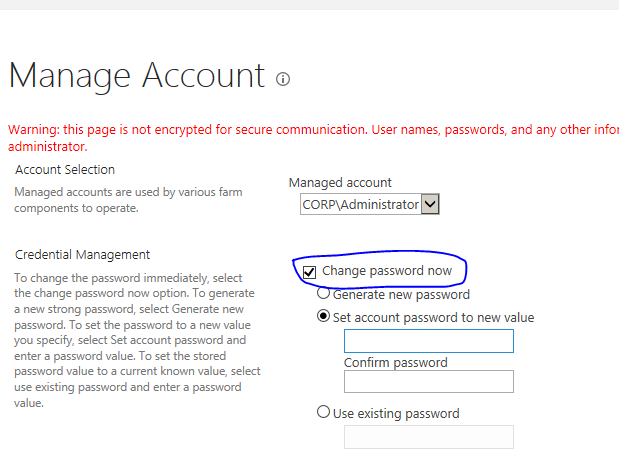
This time, I tried to update the farm administrator password using SharePoint provided interface in SharePoint Central Administration GUI instead of using the old companion STSADM or through PowerShell Command.

Post updates, I have received the error on accessing the SharePoint site and Central Administration site and error was the currently logged in user must have access to SQL Server.


To resolve this issue,
First I have checked all the services related to SharePoint has been started .
In IIS, checked all web application and application pools has been started and restarted it.
Still I am getting the access denied error to SharePoint site and SharePoint administrator site.

This time , I have manually updated the SQL server and SQL Server Agent's account with latest password and reset the IIS.


Now, my SharePoint server is up and running without any error.


Tuesday, October 25, 2016

SharePoint Client Side Rendering - Part 3

This post continuation to "Client Side Rendering - Part 2"

SharePoint Client Side Rendering , to understand from the basic, Just wanted to see how the default CSR template works on SharePoint List.

I have created the simple list with and checked the html source view in Chrome Browser.

Here its look like,

SharePoint 2013 Client Side Rendering (CSR - Learning from the basics)

And one more tips to understand how the SharePoint list being rendered using the CSR approach.

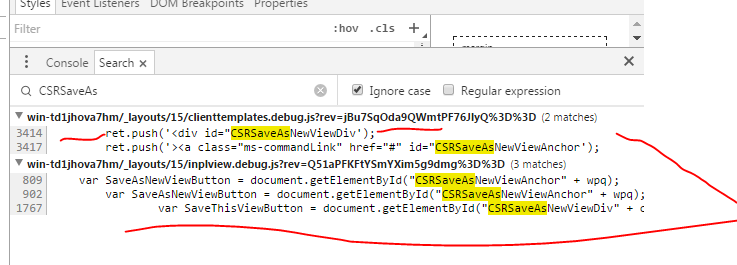
I have checked the Account list using the Chrome Browser and inspected the List and it their HTML elements. This has been designed with id "CSRSaveAsNewViewDivWPQ1", On rendering time this whole DIV will be transformed to new UI as like and tweaked in JavaScript.


Here is how its look like


SharePoint 2013 Client Rendering Template (Default)


Again, this default list's client side rendering's script on the "clienttemplates.js", in this CSRSaveAsNewViewDiv, a html link has been added using the JavaScript's array method.
Like wise, you can customise this CSRSaveAsNewViewDiv as your wishes.


In next part of Client Side Rendering, I show you how to customise the list and its look and feel in very simplest way.

Thursday, October 20, 2016

client side rendering in sharepoint - Part 2

This post continues of the Client Side Rendering Part 1

To learn more about display template or Client Side Rendering in the SharePoint 2013,we must know the DNA of the SharePoint List.

SharePoint List made of the Site Column or List Column (SPFields),Content Types,Forms (New,Edit and View Pages) and Views.

SharePoint 2013 - Display Templates,CSR, JS Link


On this image,the rounded artifacts can be customised using the CSR by using Javascript snippets, called JSLink property.


By default,When you open the SharePoint List either (AllItems.aspx or NewItem.aspx), the default template(JavasScript code) has been applied.

You can find the default clienttemplate.js file under

C:\Program Files\Common Files\Microsoft Shared\Web Server Extensions\15\TEMPLATE\LAYOUTS

For better understanding of the scenario, I could compare the AngularJS's template or component or widget but with Javascript.

You can create dynamically the templates in AngularJS or pointing the html file URL to render the View in the browser based on the business logic.

That's how the SharePoint Client Side Rendering works but with advanced JSOM based code snippets.

All columns including the taxonomy, forms, view, list view webpart and content types and their UI can be overwrite. This is the added advantage and again SharePoint 2013 ecosystem open up the opportunities for UI and UX developer.

And also CSR supporting the couple of event "OnPreRender" and "OnPostRender".

To ingrain the CSR topic technically and theoretically  , just think of the ASP.NET page's Render and PreRender event and also over riding the method in the Feature Event Receiver.

All you need is a simple java script function with UI tweak and assign to these event and over riding the fields,views,header,footer,body,group by registering the template.

SPClientTemplates.TemplateManager.RegisterTemplateOverrides(yourtemplateVariable);


Wednesday, October 12, 2016

Client Side Rendering in SharePoint 2013

Client Side Rendering in SharePoint 2013

Client Side Rendering - Part 2
Client Side Rendering - Part 3

SharePoint 2013 is not just for traditional SharePoint developer or ASP.NET programmer,  The main success of the SharePoint 2013 is ,It allows the all non Microsoft developer
to develop their respective technologies and integrate them with the SharePoint framework.

Client Side Rendering is one of the new addition to SharePoint. We all aware that all controls in the SharePoint has been developed based on ASP.NET controls.
But when it comes to rendering it on the browser, all controls are treated as HTML controls.

Almost all developer and designer or any department IT guys knows the basics of HTML and JavaScript nowadays.

I have seen many times a hard core SharePoint developer lacks behind when it comes to Page design, Content Management (WCM) or any other UI/UX develoment on their site.

Often this task has been outsourced to other team who specialised in web design or web developer come into SharePoint team.

This is huge win for SharePoint and Microsoft.The new concept "Design Manager" in SharePoint 2013 is fully belongs web developer community.

In this posts,I am going to talk about all the scenario where web developer part of the SharePoint implementation.

Client Side Rendering is one of the breakthrough changes introduced in the SharePoint 2013.

The term CSR is all about how the SharePoint data has been transformed using the HTML and JavaScript instead of the XSL/XSLT in its predecessor.


So the performance on the page loading has been increased drastically. Earlier XSLT and CAML has been used and processed on the server and send back to client, this has been burden some to server.

Learning the XSLT was one of the toughest choice for  novice programmer.

All these problems has been addressed and answer is "Client Side Rendering" or "Display Template" in SharePoint 2013.

The word "Display Template" is being used only for formatting or controlling the SharePoint Search result on Page or WebPart. But still its considered to be CSR.


Ok, Now we get in to CSR or Display templates technical details.

Sunday, September 18, 2016

Installing antivirus in SharePoint 2013

Files are backbone for every organisation and core piece of an every collaboration activities in SharePoint.

Example , an end user can upload the documents to SharePoint for any approval process taken place, SharePoint administrator can copy or download the Package(.wsp) in the server to deploy it farm wide ,SharePoint designer can download the design template from internet and uploading to SharePoint to create the branding.

In several ways user has to deal with the files, Files are prone to affect by virus or malicious script injection.

By default, SharePoint has feature that allows the user to restrict the certain files types and WebPart configuration security to guard against all malicious intention on the SharePoint server

When user download or opening the malicious file their system or  some time their whole network can be affected by virus.

Microsoft also periodically releases the Security Updates for SharePoint 2013.

To defend this problem, SharePoint allows the administrator to set  up their antivirus software on all server in the farm.

 Here is the detail, I am going to update continuously how the antivirus software works with in SharePoint ecosystem.

To learn more on this, I have the machine with Windows 2008 R2 SP1, SharePoint Server 2013 SP and SQL Server 2008 R2 SP1.

Googling the keyword "Free antivirus for Windows 2008 R2 64bit" and got the "Avast".

This is only for demonstration or learning more about installing the Antivirus on SharePoint not suggesting you or follow the same for your environment.

Download the avast antivirus and doing the custom setup,

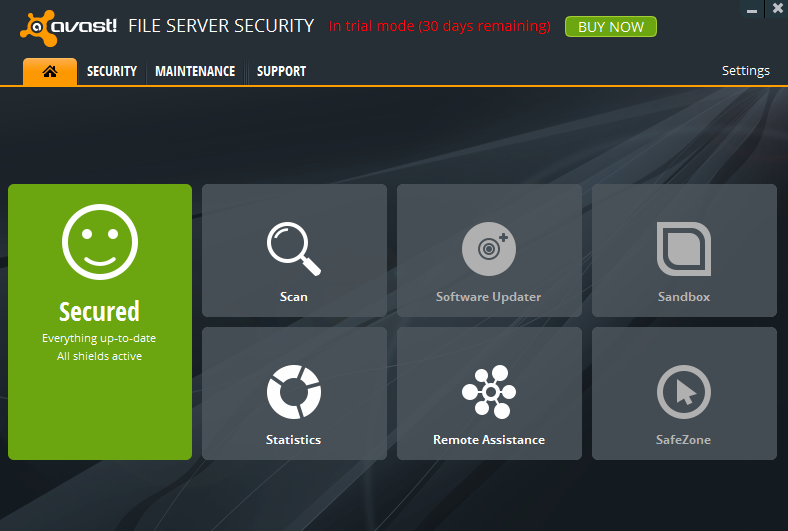
Here is the screenshot,


After installing, It shows every thing up to date and all shields are active. Now we test it in SharePoint context.


Now go to your SharePoint Central Administrator Page, click on Security link (_admin/Admin.aspx) from the left hand side , I have modified all the default settings in the page.


After this settings, on my team site, trying to upload the text file and it was little slowness,
and the message was shown to me ,

The installed virus scanner is currently unavailable.If the problem persists,contact your administrator

After rebooting my server , this problem got resolved.


Tuesday, September 13, 2016

Failed to initiate the upgrade sequence

Failed to initiate the upgrade sequence

System.TypeLoadException was thrown.Additional exception information:Method 'Upgrade' in type 'Microsoft.SharePoint.workflowservices.workflow ServiceApplicationproxy' from assembly 'Microsoft.SharePoint.WorkflowServices,Version=15.0.0.0,Culture=neutral,PublicKeyToken=71e9bce111e9429c' does not have an implementation.


Reason:

I am using the Windows 2008 R2 and SharePoint 2013 and also windows updates are automatically enabled.
SharePoint 2013 related updates and security updates are enabled on the server. After all the KBs are installed, When I am trying to run SharePoint Products Configuration Wizard, the error was thrown.

Upon searching the forums and technet article, SharePoint 2013 SP1 related updates also being part of my windows updates.

So I cannot role back all my SharePoint related updates, So decided to update the SharePoint 2013 to SharePoint 2013 SP1.
Download the SP1 for SharePoint 2013 from this link

Service Pack 1 for SharePoint 2013

All my previous  incorrect updates are taken care by this download.
Now I am able to run the PSConfig successfully without any error.

Failed to initiate the upgrade sequence

Failed to initiate the upgrade sequence

System.TypeLoadException was thrown.Additional exception information:Method 'Upgrade' in type 'Microsoft.SharePoint.workflowservices.workflow ServiceApplicationproxy' from assembly 'Microsoft.SharePoint.WorkflowServices,Version=15.0.0.0,Culture=neutral,PublicKeyToken=71e9bce111e9429c' does not have an implementation.


Thursday, March 10, 2016

Missing server side dependencies


Missing server side dependencies in SharePoint  is one the main problem that stops being upgraded or migrate to next version of the SharePoint.

SharePoint administrator has to take prompt action on this problem on his farm.


The "SharePoint Health Analyzer" report this problem under "Configuration" category and you have to take the manual job to delete these missing server side dependencies.

Example,If you are installing the WSP package that contains the features and webparts, that will create the related SharePoint artifact folders on the server  such as folder name with feature under \Template\Features and user controls under CONTROL TEMPLATE so on.

When you retracting the WSP package from the farm, it should wipe out all the folders that created on deploying the solution.

You have to create the batch file to disable/uninstall the feature while retracting them.


Same analogue, will be applied the missing server dependencies , even though  you retracted package from the server , feature / webpart name references will not be deleted from the "SharePoint_Admin_Content Database." Even though you deleted the web config entry that related to missing features, could be "" list.

This will be called "Orphaned features" in the SharePoint.Before going to look into resolve this problem, we should learn What is the reason ? why the missing server side dependencies are clogged in the SharePoint server ?

The reason is very straight forward, you might forcefully uninstall the solution without deactivating the features that are scoped to site / web / web application and Farm.

How to prevent the "Missing Dependencies" issues on the SharePoint.

Always use the "Feature event receiver class" to delete the feature folder from the server when its deactivating.

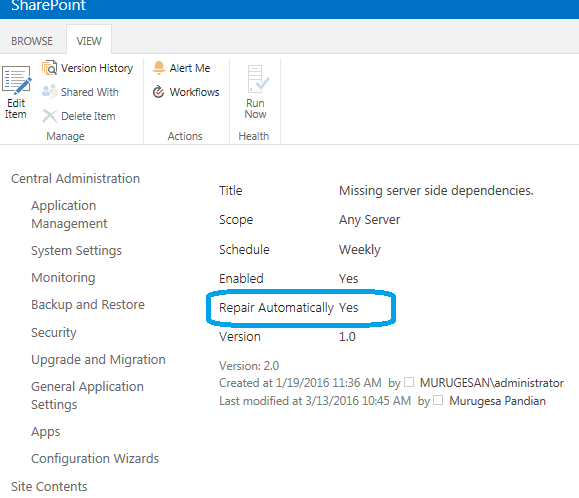
Create the "Health Analyzer definition rule to "Repair automatically" to yes.


Somehow, we missed and found so many "Missing Server Side dependencies", now  we will see on how to resolve this configuration problem,

Resolution : #1

$feature = Get-SPFeature | ? { $_.DisplayName -eq "Orphaned feature reported in HealthAnalyzer" }
$feature.Delete()
Sometime, the webpart also can be missing and reported by Health Analyzer.

I just open the content database and select the table dbo.AllWebParts and fired the delete command.(For safer side, have your Content DB backup).

Resolution : #2

DELETE  from [WSS_Content].[dbo].[AllWebParts] where tp_WebPartTypeId='c6f6e5a5-1038-13a7-87c1-0db44446d99a'

Resolution: #3,

Download the SharePoint Utility called "SharePoint Feature Administration and Cleanup" from codeplex that will help you to identify the faulty features on the farm.


Missing dependencies in SharePoint

Tuesday, March 01, 2016

Composed Looks in SharePoint 2013

Apart from "Designer Manager" in the SharePoint 2013, another remarkable  new feature in SharePoint 2013 branding side is "Composed" look that enables the site owners to change their site's look and feel as they wanted in just click of selecting the predefined template.(Theme).

The word composed means putting all the design elements such Master Page,Layout page,font,colour and background image and make the design template.
Later you can apply this template for your site.

Example,
If a Site collection administrator wanted to differentiate the each site under the site collection ,he /she could prefer to use the different composed looks.

To start this click on gear button on the site and click-->Change the look.


How this made up ?

Navigate to Site Settings-->Under web designer galleries->Click on Themes
There you will see the folder 15 (default theme applied on your site currently).Under this folder you will see the font scheme (.scheme),color palette (.spcolor) .

The combination of these file makes the  dynamic views on the SharePoint layouts (Title,WebPart Title,Dialog border,TopBar Text and Navigation related elements).

Here is the snapshot of the .spcolor file


Font scheme file snapshot


Friday, September 18, 2015

Access App - SharePoint 2013


Pros: 
  1. Access app can be created within Office 2013 client and pointing to Office 365 or On-Premise site collection 
  1. Can be use two way of authorization (app only permission , app+user permission). 
  1. Can leverage the multi authentication including the OAuth. 
  1. Access App can be created from data sources like SQL , Web Service, Excel and flat files (.txt & CSV) 
  1. App can be saved as "Snapshot" including with data , in order to move the app around all the site collections and tenants. 
  1. Supports the Form kind of operation and compatible with all devices. 
  1. Clear navigation path and multiple app templates available for Look and Feel good. 
  1. Support the Reporting , sorting and filter. 
  1. Can be editable in the Grid View Format (as seen in SharePoint 2013 List) 
  1. Can be used to run the old Access database with all Macro features that gives the business logic implementation. 
  1. built-in search functionalities to search the huge records. 


cons: 

  1. Office WebApp must have installed in all WFEs and involved licensing model. 
  1. No option to trigger the SharePoint Workflow or Item level permission. 
  1. Must have SQL 2012 Enterprise edition installed as Access App uses the SQL table behind the scene. 
  1. Access 2010 and Access 2013 app services must be up and running on the Server, Access 2010 services also required for backward compatibilities. 
  1. SharePoint App configuration (DNS Set up) must be installed and configured on the Server as Access App model relies on the SharePoint App mechanism. 
  1. Often crash as it requires relies on the installed Office Web App in SharePoint server. 
  1. Must have the dedicated Site collection for Access app to manage identical app. 

Sunday, August 16, 2015

SharePoint 2013 - Internal Column name format

I am not sure, whether my finding is true to all the list in SharePoint 2013, all column name specification or format is entirely different then its predecessor.

If you are hard code developer and familiar with inserting/deleting/ and updating the item through APIs, you might seen the columns name that comes with space between word.
Example, Employee Name (Display Name) When you deal this column in code,
The SharePoint 2010, change this column to Employee_x200_Name for identifying uniquely with in the list.

In SharePoint 2013,I create the list based on the List template, and noticed the internal name was entirely different, and SP2013 generates the internal name with random of four alphabetic


Wednesday, February 25, 2015

InfoPath 2013 form SharePoint

I posted one article in the Microsoft Technet wiki about the what is the future course of the long lasted InfoPath form in SharePoint 2013 and SharePoint 2016.

And also some prediction on what could be the successor of the InfoPath form technology at end of the article , may be I am not sure on this but 80 percent of chances there those technologies can be used to future form technology.

Read further @ Technet

Future of the InfoPath 2013 form

Friday, October 17, 2014

SharePoint 2013 Client Object Model - basic understanding

SharePoint Client Object Models

Javascript (JSOM )
You have to use this model if you host your client application within SharePoint server.
You have to include the SP.js file which is located in layout folder in 14 hive.
You can leverage the the power of JSOM conjunction with JQuery for dynamic content rendering on your client application.

Managed Object Model (CSOM) : Its .NET libraries and can be used in and out of SharePoint server, In this model you need to pass your credentials to talk with SharePoint.
You need to add the Microsoft.SharePoint.Client and Microsoft.SharePoint.Client.Runtime assemblies. You have locate these dlls in ISAPI folder.


Silverlight Object Model (SOM): Can be used any of the Silverlight application.
You need to add the Microsoft.SharePoint.Client.Silverlight and .Silverlight.Runtime assemblies. You have locate these dlls in layouts\ClientBin folder.
I am sure,It could be abbreviated to SOM  :)


All of the client side object has some advantage and limitation over Server side object model.
These models are just a layer to talk with SharePoint through built-in WCF service named "Client.svc".

The request from this models were sent to SharePoint through XML and the response from SharePoint will be JSON format and then it can be parsed.

SharePoint Client Object Model also supports the Anonymous and FBA (Form based Authentication).

You can also write RunWithElevated privilege equivalent in Client object model by passing the Network credential to ClientContext class.

It supports synchronous and asynchronous method calling.

In SharePoint 2013, Microsoft updates the Client Object Model to be worked on Managed Meta data,User Profile Service and Search Service application through REST API and CSOM.

Friday, September 12, 2014

Sign in as different user

Sign in as different user in SharePoint 2013 can be doable even if your browser setting that allows you to accept "automatic log on with current user name and password.


Its often required for developers as they wanted to test the application or SharePoint site with different user context.
It can be done in two ways,
1,Hold the Shift Key and Right click on your Internet explorer menu in the start up menu.
2,Go to "http://siteurl/_layouts/closeConnection.aspx?loginasanotheruser=true"


Monday, May 05, 2014

SharePoint.NET Client Side Object Model - CSOM

SharePoint.NET Client Side Object Model(CSOM) is one of the approach to retrieve or CRUD operation on the SharePoint data on Client side application using ASP.NET web application,Windows application or Silverlight application.

 This asp.net web application must be hosted on where SharePoint server installed. You need to add the Microsoft.SharePoint.Client.Runtime.dll and Microsoft.SharePoint.Client.dll from the Common Files\Microsoft Shared\web server extensions\15\ISAPI location.


  Example code for retrieve the SharePoint list data and showing in ASP.NET grid.
        protected void btn_Click(object sender, EventArgs e)
        {
            var fList = new List();
            FriendEntity entity = null;
            var context = new ClientContext("http://win-49qfnhnl4fj/");
            List friendList = context.Web.Lists.GetByTitle("Friends");
            var query = new CamlQuery {ViewXml = ""};
            ListItemCollection items = friendList.GetItems(query);
            context.Load(items);
            context.ExecuteQuery();
            foreach (var item in items)
            {

                entity = new FriendEntity();
                entity.Prefix = item["Title"].ToString();
                entity.FirstName = item["First_x0020_Name"].ToString();
                entity.LastName = item["Second_x0020_Name"].ToString();
                fList.Add(entity);
            }
            grid.DataSource = fList;
            grid.DataBind();

        }
        public class FriendEntity
        {
            public string Prefix { get; set; }
            public  string FirstName { get; set; }
            public  string LastName { get; set; }
        }

Sunday, April 27, 2014

Differences between CSOM and SSOM

The core differences between Client Side Object Model (CSOM) API and traditional Server Side Object Model(SSOM)

Further reading at http://intelliview.blogspot.co.uk/2014/10/sharepoint-2013-client-object-model.html
  • Administration related task such as site back,service application management and workflow related tasks can be done only through Server Side object model. 

  •  Site branding such as managing the master page,theme and CSS file cannot be done in Client Side object model. 

  •  Request Batching (Series of Request for data retrieval on the Client context) submitted to the server in a single request.This can be done using Client side object model and REST API.

Thursday, March 27, 2014

Creating List Definition and List Instance in Visual Studio 2012

This post may be seems to be simple for creating the List Definition,List Instance in SharePoint using Visual Studio 2010.

But definitely not when you are trying to implement using latest visual studio 2012 or 2013. Of course there are many instances to be created visually in VS 2012 but there you cannot find the "List Definition" project item as you were seen in VS2010.

To create the List Definition in VS 2012 or 2013 you need to select the "List" item template and select the "Create a customizable list template and list instance of it" and choose default (Custom List) as shown in the figure


else you will not get the List definition templates (List Instance, Element.xml, List template and its element.xml and Schema.xml).

Some points to note down here..Why should we need ? just consider you wanted to create the site definition with desired list (Feature Stapling - You will get two feature with site and web scoped from List definition template) and another scenario where you wanted to organize the SharePoint folders based on multiple layer.
Finally its helpful to develop the Model-View-Control (MVC) pattern based SharePoint application

Visual Studio 2013 simplifies the developer job by letting them to create the columns visually.In WSS 3.0 days It was so tedious job to manually creating the Field tag with multiple attributes and GUID for each fields.
The only simplest way is keeping the List Definitions Feature ID and ListInstance's Feature ID same

Now everything is just like that create all your columns and bind the content types in GUI as shown in the below screen.


Schema.xml file will be generated as you select columns and views from the above screen

List Definition Folder structure in SharePoint 2013


Monday, February 24, 2014

DocuSign e-Signing for Office 365

DocuSign will bring its eSignature electronic signature apps to Office 365, a move that’s probably as important for Microsoft as it is for users. The eSignature technology will appear in the Office 365 Office Store in early March, fleshing out an app store that’s still woefully short of useful plugins. 

As anyone who’s negotiated contract proceedings via fax already knows, the process of receiving a contract, signing it, scanning or faxing it, and then repeating the process multiple times virtually cries out for an electronic solution. Historically, the process of appending an e-signature was attached to Adobe PDF files, as they were trusted to remain unchanged. Then Microsoft added support for e-signatures in Office 2010. It’s been a trusted seal that’s “broken” if content is altered after a signature is applied.

DocuSign uses a similar approach, with a laundry list of security protections. Now, however, customers who already use Office 365 can add support for the e-signature technology from their consoles. Support for Outlook, Word, SharePoint Online and SharePoint Server 2013 has been included, DocuSign said. DocuSign also adopted Windows Azure Active Directory to provide single sign-on capabilities with Office 365 credentials.
DocuSign will show off (and most likely launch) the new apps at the Microsoft SharePoint Conference in Las Vegas, which runs from March 3 through March 6. More details can be found on its website, DocuSign said. 
Microsoft’s own Office Store has been relatively bereft of its own apps, either indicating that Microsoft itself has left no stone unturned, or that developers haven’t seen a need to join the Office app store party. Developers who’ve written for the platform have said they haven’t seen the returns they were hoping for, and the relatively low number of reviews attached to most apps seems to support that.
On the other hand, simply publishing an app like DocuSign’s eSignature to the Office Store can’t help but encourage more customers to visit. DocuSign’s customer base includes companies from American Airlines to Costco to Monsanto. In this case, DocuSign may have more to offer Microsoft than the other way round.